Sign up with Google
 Sign in with Zoho

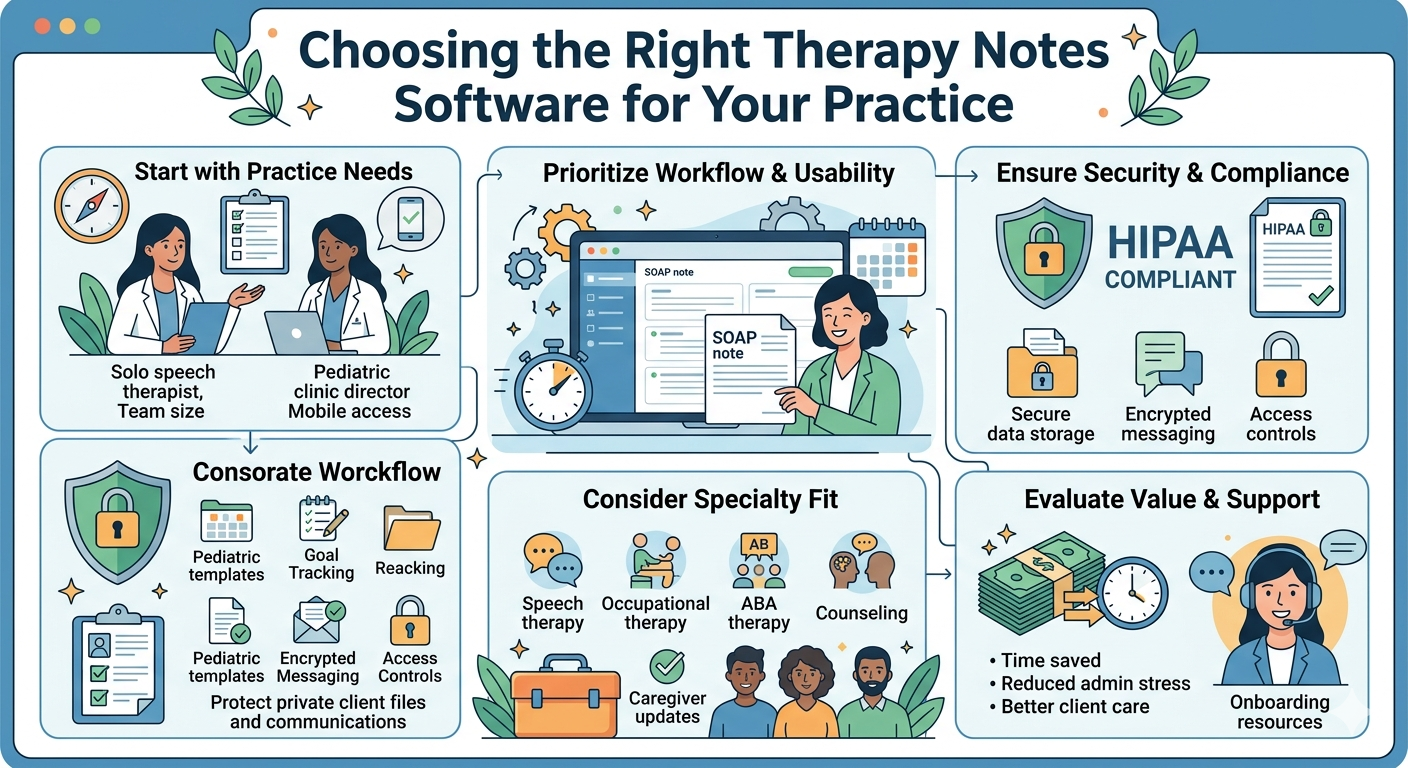
If you are searching for practice management software for therapists, choosing the right therapy notes software can make a real difference in how smoothly your practice runs. Good software should do more than help you write notes. It should support your workflow, save time, reduce admin stress, and help you stay focused on client care.
For many therapists, documentation is one of the most time consuming parts of the day. Notes, treatment plans, progress tracking, scheduling, communication, and compliance all add up quickly. The right platform can simplify these tasks and help your team stay organized without feeling overwhelmed.
This guide will help you understand what to look for when choosing therapy notes software for your practice and how to make a decision that fits your needs.
Why Therapy Notes Software Matters
Therapy notes software is no longer just a digital place to store session records. It has become an essential part of running a modern therapy practice.
Whether you work in speech therapy, occupational therapy, ABA, counseling, or another specialty, your documentation system affects nearly every part of your day. When your software is easy to use, your team can complete notes faster, stay compliant, and spend more time with clients instead of screens.
The wrong system can create the opposite experience. It can slow down documentation, make scheduling harder, and increase frustration for providers and admin staff.
That is why choosing the right software is not just a tech decision. It is a workflow decision.
Start With Your Practice’s Real Needs
Before comparing platforms, take a step back and look at how your practice actually works.
Every clinic is different. A solo therapist may need something simple and clean. A growing pediatric practice may need scheduling, therapist coordination, teletherapy tools, and team communication. A multi provider clinic may also need role based access and stronger reporting.
Ask yourself a few practical questions:
- How many providers will use the software?
- Do you need templates for specific therapy types?
- Do you need scheduling and calendar management?
- Will you be using teletherapy or virtual sessions?
- Do you need parent or caregiver communication tools?
- Do you want mobile access for therapists on the go?
The more clearly you understand your daily workflow, the easier it becomes to choose software that actually helps.
Look for Easy and Flexible Documentation
The main purpose of therapy notes software is to make documentation easier, not more complicated.
A strong system should help therapists complete notes efficiently while still capturing the details needed for quality care and compliance. Look for software that offers flexible templates and note formats that fit your discipline.
Helpful features often include:
- SOAP notes and custom note templates
- Progress note documentation
- Goal tracking
- Treatment plan creation
- Session history access
- Digital signatures
A good platform should also allow therapists to personalize documentation instead of forcing every provider into the same rigid format.
The easier it is to complete notes accurately, the more likely your team will stay consistent.
Make Sure It Supports Scheduling Too
Many therapy practices use one tool for notes and another for scheduling. Over time, that split can create confusion, duplicate work, and missed details.
Choosing a system that includes scheduling can make your operations much smoother. Therapists and admin staff can view appointments, document sessions, and stay on the same page without switching between multiple platforms.
Look for scheduling features such as:
- Calendar views for individuals and teams
- Recurring appointment setup
- Appointment reminders
- Therapist availability management
- Waitlist or rescheduling support
This kind of integration helps reduce no shows and improves the overall client experience.
Prioritize HIPAA Compliance and Security
When you are handling sensitive client information, security is not optional.
Any therapy notes software you choose should be HIPAA compliant and built to protect both your documentation and communication. This matters for therapists, clinic owners, and families who trust your practice with private health information.
Before choosing a platform, make sure it offers:
- Secure data storage
- Encrypted communication
- Access controls for team members
- Audit trails or activity logs
- Secure document sharing
You should also check whether the company clearly explains how it handles compliance and privacy. If security information is difficult to find, that is a sign to look more closely.
Think Beyond Notes and Consider Workflow
One of the biggest mistakes practices make is choosing software based only on note writing. In reality, your team needs support across the full client journey.
Good therapy software should help you manage the work around documentation too. That includes communication, organization, and follow through.
Useful workflow tools may include:
- Intake form management
- Progress tracking
- Internal team communication
- Parent or caregiver updates
- File and document storage
- Task reminders
When all of these pieces work together, your staff spends less time chasing paperwork and more time delivering care.
Choose Software Your Team Will Actually Use
A feature packed system is not always the best choice if it feels difficult or frustrating to use.
One of the most important things to consider is usability. If your therapists or staff avoid using the platform because it feels confusing, the software will not solve your problems.
A good therapy notes platform should feel intuitive. The layout should be simple, navigation should be clear, and common tasks should not take too many clicks.
If possible, ask for a demo and pay attention to how the software feels in real use. Ask yourself:
- Can therapists learn it quickly?
- Does it feel clean and organized?
- Is it easy to complete notes and move between tasks?
- Can admin staff use it without extra complexity?
Ease of use often has a bigger impact than flashy features.
Consider Specialty Fit for Your Practice
Not all therapy practices document care the same way. A platform that works well for general mental health may not be the best fit for pediatric therapy, speech therapy, OT, or ABA.
This is where specialty specific tools matter.
For example, some practices may need:
- Goal based pediatric documentation
- Session based service tracking
- Caregiver communication tools
- Multi therapist scheduling
- Discipline specific templates
Software that understands your type of care can save your team time and reduce the need for workarounds.
That is especially important if your clinic serves children, families, schools, or multidisciplinary teams.
Look at Support and Ongoing Updates
Choosing software is not just about the product you see on day one. It is also about the support you receive after signup.
Even the best platform will raise questions as your team gets started. That is why customer support and onboarding matter.
Look for a company that offers:
- Guided onboarding
- Helpful training resources
- Responsive support
- Product updates based on user needs
A strong support team can make implementation much easier and help your practice get full value from the software.
You want a platform that grows with your clinic instead of becoming outdated after a few months.
Compare Value, Not Just Price
It is tempting to compare therapy software only by monthly cost, but the cheapest option is not always the best value.
Instead of focusing only on price, ask what the software will save your team in time, effort, and operational stress. A platform that helps your therapists finish notes faster and keeps your schedule organized can create long term value far beyond the subscription cost.
Think about what matters most:
- Time saved on documentation
- Reduced admin burden
- Better team coordination
- Improved client experience
- Less need for multiple tools
When you look at the bigger picture, the right software becomes an investment in how your practice runs every day.
Choosing therapy notes software is really about choosing a better workflow for your team and a better experience for your clients.
The best option will be the one that supports your documentation, simplifies your operations, and fits the way your practice actually works. It should help your team stay organized, compliant, and focused on care without adding more complexity.
If you are evaluating tools right now, take time to think beyond note templates alone. Look for a solution that supports the full rhythm of your clinic and helps your team work with less friction.
That is exactly why so many practices are now looking for best therapy practice management software 2026 that goes beyond basic note taking and supports real day to day clinical operations.
FAQs
1. What should I look for in therapy notes software?
You should look for software that makes documentation easy, supports scheduling, protects client data, and fits your therapy workflow. Features like note templates, progress tracking, secure access, and calendar management are especially helpful.
2. Is therapy notes software the same as practice management software?
Not always. Some therapy notes tools focus only on documentation, while others include scheduling, communication, teletherapy, reminders, and other operational features. Many practices prefer an all in one solution to reduce extra admin work.
3. How do I know which software is right for my therapy practice?
Start by identifying your daily workflow, team size, therapy specialty, and operational needs. The right platform should feel easy to use and support the way your practice already works rather than forcing your team to adapt to a complicated system.