Sign up with Google
 Sign in with Zoho

Most jewelry stores struggle online not because of pricing or product quality, but because customers cannot clearly visualize what they are buying. Jewelry is detailed, reflective, and highly personal. If shoppers cannot understand how a piece will look, they hesitate. That hesitation leads to lower conversions and higher returns.
Improving product visualization is one of the most effective ways to increase trust, engagement, and sales. When customers can clearly see and experience a product, they are far more likely to make a purchase.
Why Product Visualization Matters in Jewelry
Jewelry is not a standard ecommerce product. Buyers look for:
- Fine craftsmanship
- Accurate size and scale
- Real-life appearance
Unlike clothing or electronics, even small details can influence the buying decision. A slight difference in shine or size can change how a customer feels about a piece.
When visualization is poor:
- Customers leave without buying
- Cart abandonment increases
- Return rates go up
Better visualization solves all three problems.
Common Visualization Mistakes Jewelry Stores Make
Before improving, it’s important to understand where most stores go wrong.
1. Using Limited Product Images
Many stores upload only 2–3 images per product. This is not enough for jewelry. Customers want to see multiple angles.
2. Poor Lighting and Quality
Low-quality images fail to capture sparkle, reflections, and textures.
3. No Real-World Context
Products shown on plain backgrounds do not help customers understand size or how the item looks when worn.
4. Lack of Interactive Experience
Static images do not allow users to explore products in detail.
5. No Try-On Option
Customers cannot imagine how a ring or necklace will look on them.
Fixing these issues can significantly improve performance.
Key Ways to Improve Product Visualization
1. Use High-Quality, Multi-Angle Images
Start with the basics. Every product should include:
- Front, side, and back views
- Close-up shots for details
- Lifestyle images showing real usage
Make sure lighting highlights the shine and texture of the jewelry.
2. Add Zoom and Detail Features
Customers should be able to zoom in without losing clarity. This helps them inspect:
- Stone quality
- Metal finish
- Craftsmanship
High-resolution images improve trust and reduce uncertainty.
3. Show Jewelry in Real-Life Context
Context helps customers understand how jewelry looks when worn.
Use:
- Hand shots for rings
- Neck shots for necklaces
- Face shots for earrings
This gives a better sense of scale and appearance.
4. Introduce 360-Degree Product Views
360-degree views allow customers to rotate the product and see it from every angle.
Benefits:
- Better product understanding
- Increased engagement
- Higher confidence
This is a step ahead of static images.
5. Use 3D Product Visualization
3D models take visualization to the next level. Customers can:
- Rotate products freely
- Zoom into details
- View realistic textures and reflections
This creates an experience closer to holding the product in hand.
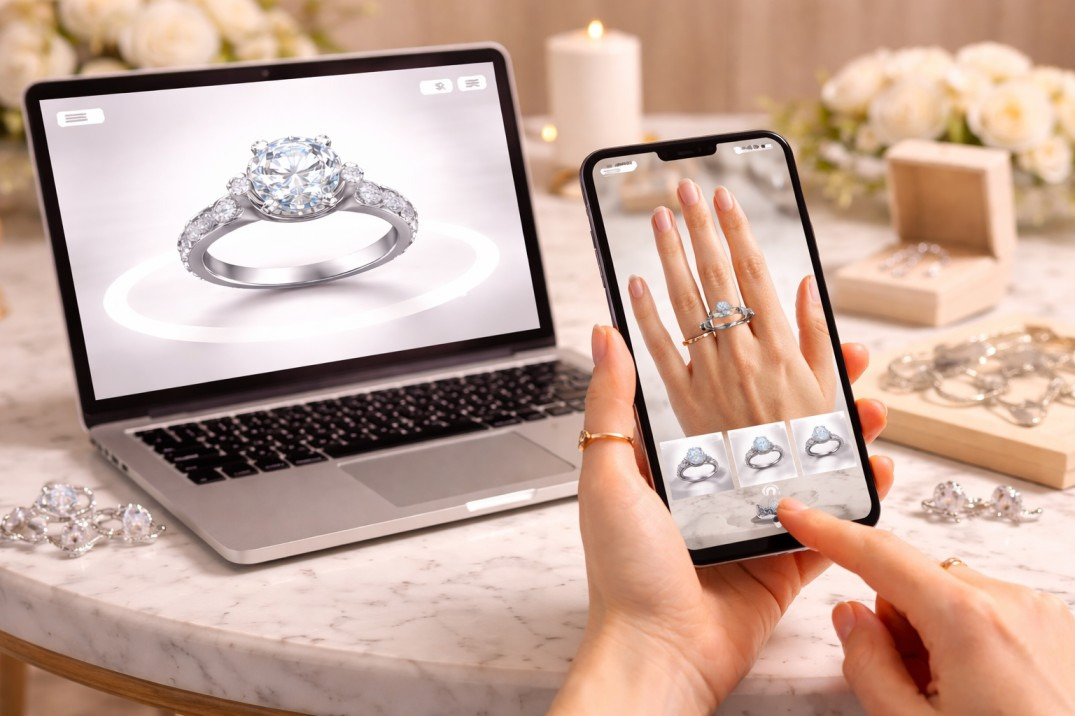
6. Enable Virtual Try-On with AR
One of the biggest improvements comes from augmented reality.
With AR:
- Customers can try rings on their fingers
- See how necklaces sit on their neck
- Check how earrings look on their face
This removes guesswork completely.
Instead of imagining, customers can see the product on themselves in real time.
How Better Visualization Impacts Sales
Improving product visualization is not just about design. It directly affects business results.
1. Higher Conversion Rates
When customers feel confident, they are more likely to buy.
2. Lower Return Rates
Better understanding leads to fewer mismatches.
3. Increased Engagement
Interactive features keep users on your site longer.
4. Stronger Brand Trust
A well-presented product builds credibility.
The Role of Technology in Modern Jewelry Stores
Technology is now a key part of ecommerce success.
Basic improvements like images and videos are no longer enough. Customers expect interactive and personalized experiences.
This is where advanced solutions come in.
Platforms like AR Jewelry Software For Jewelry Stores help businesses upgrade their product presentation. For example, Arbling allows jewelry stores to convert products into 3D models and offer virtual try-on experiences directly on their website.
This type of solution helps:
- Improve product clarity
- Build buyer confidence
- Increase conversions without heavy manual effort
It also makes smaller stores competitive with larger brands.
Best Practices for Implementing Visualization Tools
1. Focus on Accuracy
Make sure 3D models and AR placements match real product dimensions.
2. Optimize for Mobile
Most users shop on mobile devices. Your visualization tools must work smoothly on phones.
3. Keep Loading Speed Fast
Heavy visuals can slow down your website. Optimize files for performance.
4. Test User Experience
Ensure the tools are easy to use and do not confuse customers.
How Small Jewelry Stores Can Compete
You don’t need a massive budget to improve visualization.
Start step by step:
- Improve product photography
- Add zoom and multiple angles
- Introduce 360 views
- Gradually move to 3D and AR
Even small improvements can make a noticeable difference.
Future of Product Visualization in Jewelry
Jewelry ecommerce is moving toward more interactive experiences.
Trends to watch:
- AR becoming a standard feature
- AI helping customers choose products
- Social media integrating virtual try-on
Customers will expect more than just images. They will expect an experience.
Conclusion
Improving product visualization is one of the most effective ways to grow a jewelry business online. When customers can clearly see and understand a product, they feel confident making a purchase.
From better images to 3D models and AR try-on, every improvement reduces doubt and increases trust.
Jewelry stores that invest in better visualization will not only increase sales but also create a smoother and more reliable shopping experience for their customers.