Sign up with Google
 Sign in with Zoho

Handling large CSV files can quickly become overwhelming, especially when you need to organize data based on specific categories. One of the most efficient ways to manage this is to split a CSV file by column value. Whether you're a data analyst, developer, or business user, this technique helps you break down complex datasets into smaller, meaningful files.
In this comprehensive guide, you’ll learn what it means to split a CSV file by column value, why it’s useful, and multiple methods to do it easily.
What Does “Split CSV File by Column Value” Mean?
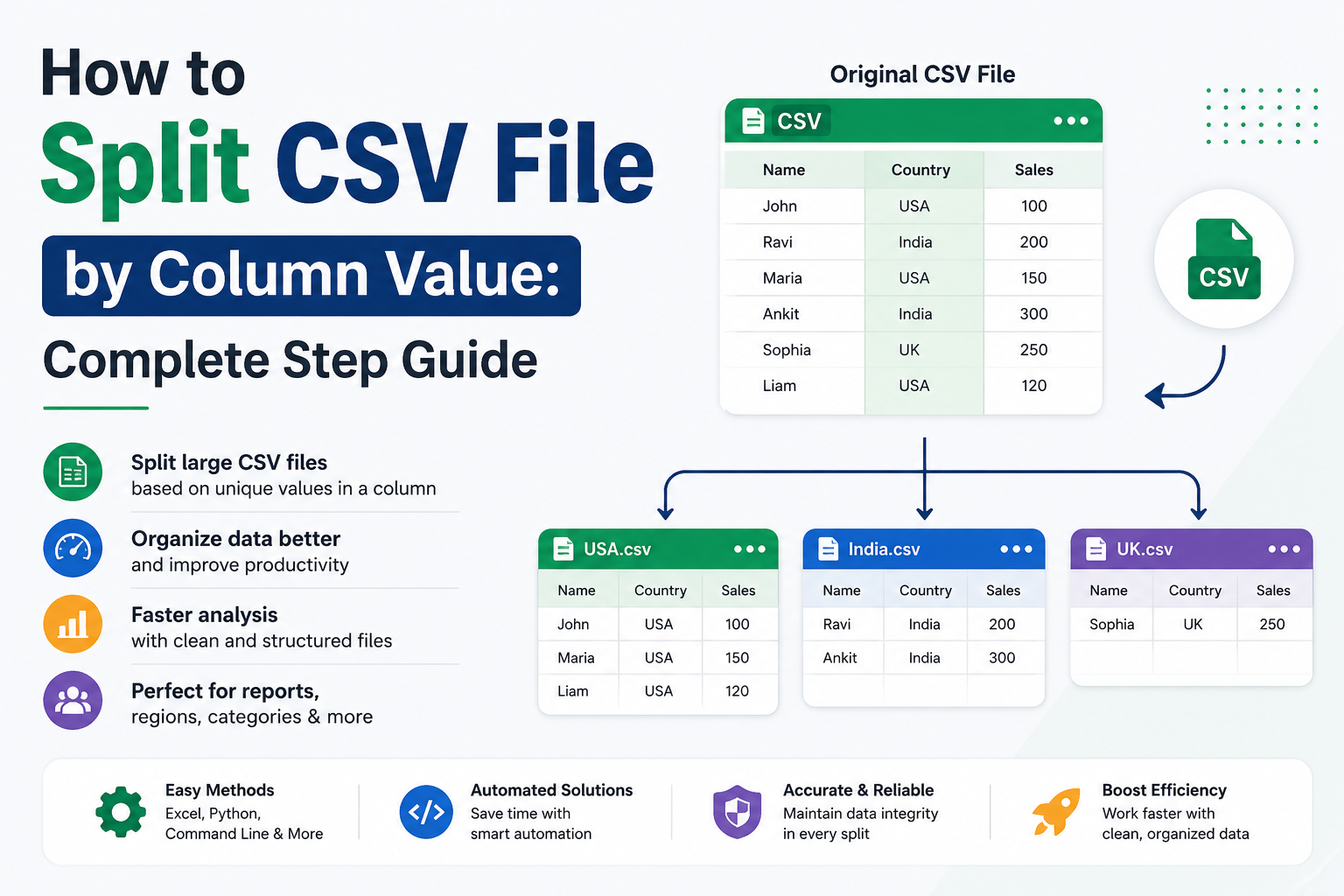
Splitting a CSV file by column value refers to dividing a large CSV file into multiple smaller files based on the unique values in a specific column.
Example:
Suppose you have a CSV file with a column named “Country”:
If you split the CSV file by the “Country” column, you’ll get:
- USA.csv → Contains rows with USA
- India.csv → Contains rows with India
Why Split CSV File by Column Value?
Splitting CSV files offers several practical benefits:
1. Better Data Organization
Breaking data into smaller files makes it easier to manage and analyze.
2. Faster Processing
Smaller files improve performance in tools like Excel, databases, or scripts.
3. Improved Collaboration
Teams can work on specific datasets without handling the entire file.
4. Targeted Analysis
You can focus on specific categories, regions, or groups.
Common Use Cases
- Splitting customer data by region or country
- Dividing sales reports by product category
- Separating logs by date or status
- Organizing survey responses by answer type
Methods to Split CSV File by Column Value
There are multiple ways to achieve this depending on your technical expertise and tools.
Method 1: Using Excel (Manual Approach)
If your file is small, you can use Excel.
Steps:
- Open the CSV file in Excel
- Select the column you want to split by
- Apply a filter
- Filter each value one by one
- Copy filtered data into a new sheet
- Save each sheet as a separate CSV file
Limitations:
- Time-consuming
- Not suitable for large files
- Manual effort required
Method 2: Using Python (Automated & Powerful)
Python is one of the best tools to split CSV files efficiently.
Sample Code:
import pandas as pd
# Load CSV file
df = pd.read_csv("data.csv")
# Split by column value
for value, group in df.groupby("Country"):
group.to_csv(f"{value}.csv", index=False)
Benefits:
- Fully automated
- Handles large datasets
- Saves time and effort
Method 3: Using Command Line (For Advanced Users)
You can use command-line tools like awk.
Example:
awk -F, '{print > ($2 ".csv")}' data.csv
Here, $2 represents the second column.
Pros:
- Fast
- Works well for large files
Cons:
- Requires technical knowledge
Method 4: Using Online Tools
There are several online tools available to split CSV files.
Steps:
- Upload your CSV file
- Select the column to split
- Choose split criteria
- Download output files
Drawbacks:
- File size limits
- Data privacy concerns
Method 5: Using Professional CSV Splitter Tools
For large-scale or business use, dedicated tools are the best option. For that, we recommend using SysTools CSV Splitter Tool.
Features:
- Split CSV file by column value automatically
- Maintain data integrity
- Handle large files without crashes
- Batch processing
These tools are ideal for users who want accuracy and speed without coding.
Best Practices When Splitting CSV Files
To ensure smooth processing, follow these tips:
1. Clean Your Data First
Remove duplicates, empty rows, or errors before splitting.
2. Use Proper Column Names
Ensure the column you are splitting by is correctly labeled.
3. Check Encoding
Use UTF-8 encoding to avoid character issues.
4. Backup Original File
Always keep a copy of your original dataset.
5. Test on Small Data
Before processing a large file, test your method on a smaller sample.
Challenges You May Face
1. Large File Size
Very large CSV files may crash Excel or slow down scripts.
2. Inconsistent Data
Mixed or missing values can lead to incorrect splits.
3. Special Characters
Encoding issues may break the output files.
4. Duplicate Column Values
Repeated values may overwrite files if not handled properly.
Tips to Overcome Challenges
- Use automation tools like Python
- Validate data before processing
- Use unique naming conventions
- Monitor memory usage
When Should You Split a CSV File?
You should split a CSV file by column value when:
- The dataset is too large to manage
- You need category-wise analysis
- Different teams need different data
- You want faster data processing
Conclusion
Learning how to split CSV file by column value is an essential skill for anyone working with data. Whether you choose Excel for small tasks, Python for automation, or professional tools for large datasets, the right method depends on your needs.
By organizing your data into smaller, structured files, you can improve efficiency, accuracy, and productivity. Start with simple methods and gradually move to automated solutions for better results.