Sign up with Google
 Sign in with Zoho

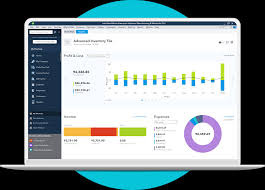
Managing a growing business demands smarter tools, not just harder work. That's exactly why thousands of business owners across the United States are turning their attention to QuickBooks Enterprise 2026 — the most feature-rich version Intuit has released to date. Whether you're still running Desktop Pro, sticking with Premier, or already on an older Enterprise build, this edition brings meaningful upgrades that can streamline operations, reduce manual work, and give you sharper financial visibility.
In this guide, we'll break down every major new feature, explain why now is the right time to upgrade to QuickBooks Enterprise from Desktop Pro/Premier, and answer the most common questions business owners are asking in 2026.
Why QuickBooks Enterprise 2026 Stands Out
QuickBooks has always been a reliable backbone for small and mid-sized businesses. But Enterprise 2026 isn't just an incremental patch — it's a platform evolution. Intuit has focused this release on three core pillars: automation, scalability, and real-time intelligence. Each update in this version reflects feedback from actual business users who needed their accounting software to work harder, faster, and smarter.
Here's a closer look at what's changed.
Top New Features in QuickBooks Enterprise 2026
1. AI-Powered Cash Flow Forecasting
One of the most talked-about additions in QuickBooks Enterprise 2026 is the built-in AI-powered cash flow forecasting engine. Unlike basic projections that rely purely on historical averages, this tool analyzes spending patterns, seasonal trends, receivables aging, and vendor payment cycles to generate rolling 90-day forecasts with surprising accuracy. For businesses that have struggled with cash crunches or overspending, this feature alone is worth the upgrade.
2. Advanced Inventory with Real-Time RFID and Barcode Sync
If your business carries physical inventory, Enterprise 2026 finally delivers seamless real-time synchronization with RFID scanners and barcode systems. Previous versions required workaround integrations or third-party middleware. Now, warehouse staff can scan items and have inventory counts update instantly in QuickBooks, reducing shrinkage reporting delays and improving reorder accuracy. Businesses with multiple warehouses can manage all locations from a single, unified dashboard.
3. Upgraded Role-Based Permissions Engine
Security and access control have always been a concern for growing teams. The 2026 edition introduces a completely rebuilt permissions engine that lets administrators define access down to individual report types, transaction categories, and even specific customer records. This is especially useful for businesses that work with outside accountants, part-time bookkeepers, or multiple department heads who each need their own limited view of the financials.
4. Automated Bill Approval Workflows
Manual approval chains slow everything down. QuickBooks Enterprise 2026 introduces configurable automated approval workflows for bills and purchase orders. You can set up multi-step approvals based on dollar thresholds, vendor type, or department — and the system routes each item automatically, sends reminders, and logs approvals with a full audit trail. This is a game-changer for businesses processing high volumes of vendor invoices every month.
5. Enhanced Reporting with Custom KPI Dashboards
The new reporting suite in Enterprise 2026 goes well beyond standard P&L and balance sheets. Users can now build custom KPI dashboards that pull live data and display it in charts, gauges, or comparison tables. Whether you're tracking gross margin by product line, monitoring accounts receivable turnover, or watching labor cost as a percentage of revenue, your dashboard can show it in real time — no exporting to spreadsheets required.
6. Deeper E-Commerce and Marketplace Integrations
Selling across multiple channels? Enterprise 2026 expands its native integration library to include direct connectors for Shopify, Amazon Seller Central, WooCommerce, and Walmart Marketplace. Orders, refunds, and inventory updates sync automatically, keeping your books clean without manual data entry. This is a significant upgrade from the limited plugin-based approach that older Desktop versions relied on.
7. Payroll Compliance Updates for 2026
Tax laws change every year, and Enterprise 2026 is fully updated to reflect federal and state-level payroll compliance changes effective in 2026. Automated tax table updates, new W-4 handling, and improved support for contract and gig workers make payroll processing more accurate and less stressful.
Should You Upgrade to QuickBooks Enterprise from Desktop Pro/Premier?
If you're currently using QuickBooks Desktop Pro or Premier, the honest answer is: yes, and probably sooner than you think.
Desktop Pro and Premier have served millions of businesses well, but they carry real limitations that become painful as companies grow. Neither product supports more than 5 simultaneous users. Both have restricted inventory tracking compared to Enterprise. And as Intuit continues shifting investment toward the Enterprise and cloud platforms, Desktop Pro and Premier users can expect fewer feature updates going forward.
QuickBooks Enterprise, by contrast, supports up to 40 simultaneous users, includes industry-specific editions for manufacturing, retail, nonprofit, and professional services, and gives you access to tools like the ones described above that simply aren't available in the lower-tier products.
The migration process itself has also been streamlined in the 2026 version. Intuit has introduced a guided Data Migration Wizard that converts your existing Desktop Pro or Premier company file into an Enterprise-compatible format with minimal manual cleanup. Most businesses complete the migration in a single afternoon.
If you have questions about whether your specific data setup is migration-ready, or if you want expert guidance before making the switch, you can call +1-866-408-0444 to speak with a certified QuickBooks Enterprise specialist who can walk you through the process step by step.
Who Is QuickBooks Enterprise 2026 Best For?
This platform is ideally suited for:
- Product-based businesses with complex inventory needs across multiple locations
- Service businesses with 10+ employees and department-level financial tracking requirements
- Contractors and project-based companies needing job costing and project profitability analysis
- Retailers and e-commerce sellers managing multiple sales channels
- Nonprofit organizations requiring fund accounting and grant tracking
If your business has outgrown the reporting depth, user limits, or inventory tools of Desktop Pro or Premier, Enterprise 2026 is the logical next step.
Final Thoughts
QuickBooks Enterprise 2026 is a serious upgrade — not just in features, but in the overall philosophy behind the platform. It's designed for businesses that are genuinely growing and need their financial software to grow with them. From AI-driven forecasting to automated approval workflows, the new tools in this edition tackle real pain points that small business owners deal with every day.
If you're ready to explore whether upgrading to QuickBooks Enterprise from Desktop Pro/Premier is the right move for your business, don't guess — get expert advice. Call +1-866-408-0444 today and let a certified specialist help you evaluate your options, plan your migration, and make the most of everything Enterprise 2026 has to offer.
Frequently Asked Questions (FAQs)
Q1: What is the main difference between QuickBooks Enterprise 2026 and Desktop Pro?
QuickBooks Enterprise 2026 supports up to 40 simultaneous users, includes advanced inventory management, AI-powered reporting, automated workflows, and industry-specific editions — none of which are available in Desktop Pro, which is limited to 3–5 users and basic bookkeeping features.
Q2: Can I migrate my existing QuickBooks Desktop Pro or Premier data to Enterprise 2026 without losing anything?
Yes. QuickBooks Enterprise 2026 includes a guided Data Migration Wizard that converts your company file with full transaction history, vendor records, customer data, and chart of accounts intact. It's recommended to back up your file before migrating and run a data verification afterward.
Q3: Is QuickBooks Enterprise 2026 a one-time purchase or a subscription?
QuickBooks Enterprise 2026 is available as an annual subscription plan. The subscription includes software access, automatic updates, payroll tax table updates (if payroll is included), and priority customer support depending on the tier you select.
Q4: Does QuickBooks Enterprise 2026 work in the cloud, or is it only desktop-based?
Enterprise 2026 is primarily a desktop-installed application, but Intuit offers a hosted cloud option through authorized hosting providers. This allows users to access Enterprise remotely from any device while keeping the full desktop experience and feature set intact.
Q5: How long does it take to upgrade from Desktop Pro/Premier to Enterprise 2026?
For most small to mid-sized businesses, the full upgrade — including installation, data migration, and basic setup — can be completed in one to four hours. Businesses with complex custom reporting or large transaction histories may need additional time for data cleanup and testing.

.webp)