Sign up with Google
 Sign in with Zoho
.webp)
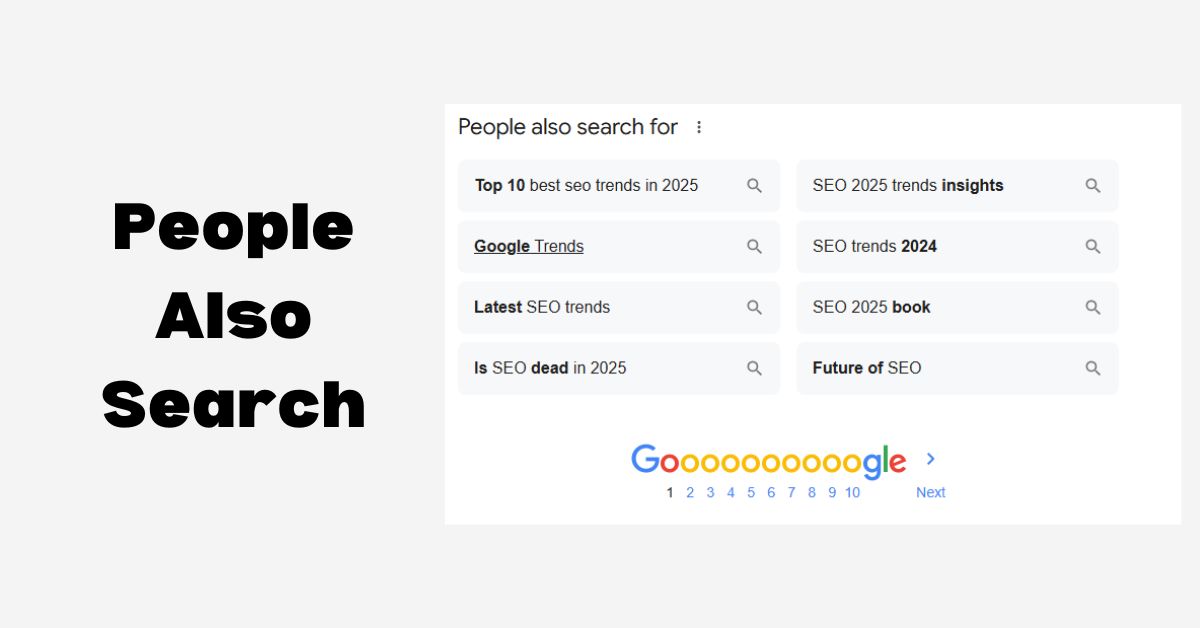
The PASF box is Google’s way of saying, "I see you didn't find what you were looking for; maybe these other topics will help." It only appears when a user "pogosticks"—which is SEO slang for clicking a link and then immediately jumping back to the search results.
Google tracks this behavior. If people keep leaving your page to look for something else, it’s a signal that your content might have a "gap." PASF shows you exactly what those gaps are by listing the related terms users are clicking on instead.
Why Should You Care About PASF?
In the old days of SEO, we used to just guess which keywords to use. Today, Google is giving us the answers for free. Here is why PASF is a game-changer:
- It Reveals Real Search Intent: Sometimes a keyword is broad. If someone searches for "SEO," are they looking for a definition, a service, or a checklist? PASF tells you the specific sub-topics people are actually interested in.
- It Helps You Rank for More Terms: By including PASF terms in your articles, you aren't just ranking for one main keyword; you’re capturing "long-tail" traffic—those specific phrases that are often easier to rank for.
- It Reduces Your Bounce Rate: If you answer the questions found in the PASF box directly on your page, users won’t need to hit the back button. This tells Google your page is high-quality, which can lead to better rankings.
How to Use PASF in Your Strategy
You don’t need expensive tools to start using this; you just need a bit of curiosity.
1. Fill the Content Gaps
When you’re writing a blog post, perform a search for your target keyword. Click on a top competitor, then immediately hit back. Look at the PASF terms that appear. If your article doesn't cover those topics, add a section that does. This makes your content the "one-stop shop" for that subject.
2. Create Better Subheadings
Don’t just guess what your H2 and H3 tags should be. Use PASF terms as your subheadings. This naturally weaves relevant keywords into your page structure and ensures you are answering the most common questions related to your topic.
3. Structure Your FAQs
The PASF box is essentially a list of "Frequently Asked Questions." Use these terms to build an FAQ section at the bottom of your pages. This is a great way to target "featured snippets" (those position-zero boxes at the top of Google).
4. Improve Your Internal Linking
If PASF suggests a topic that is too big to cover in your current article, create a separate blog post for it. Then, link the two together. This builds "topical authority," showing Google that you are an expert on the entire subject, not just one small part of it.
Final Thoughts
SEO isn’t just about pleasing an algorithm; it’s about being helpful to humans. Google’s "People Also Search For" feature is a direct window into the human mind. By paying attention to these suggestions, you can create content that is more relevant, more engaging, and—most importantly—more likely to stay at the top of the search results.