 Sign up with Google
 Sign in with Zoho

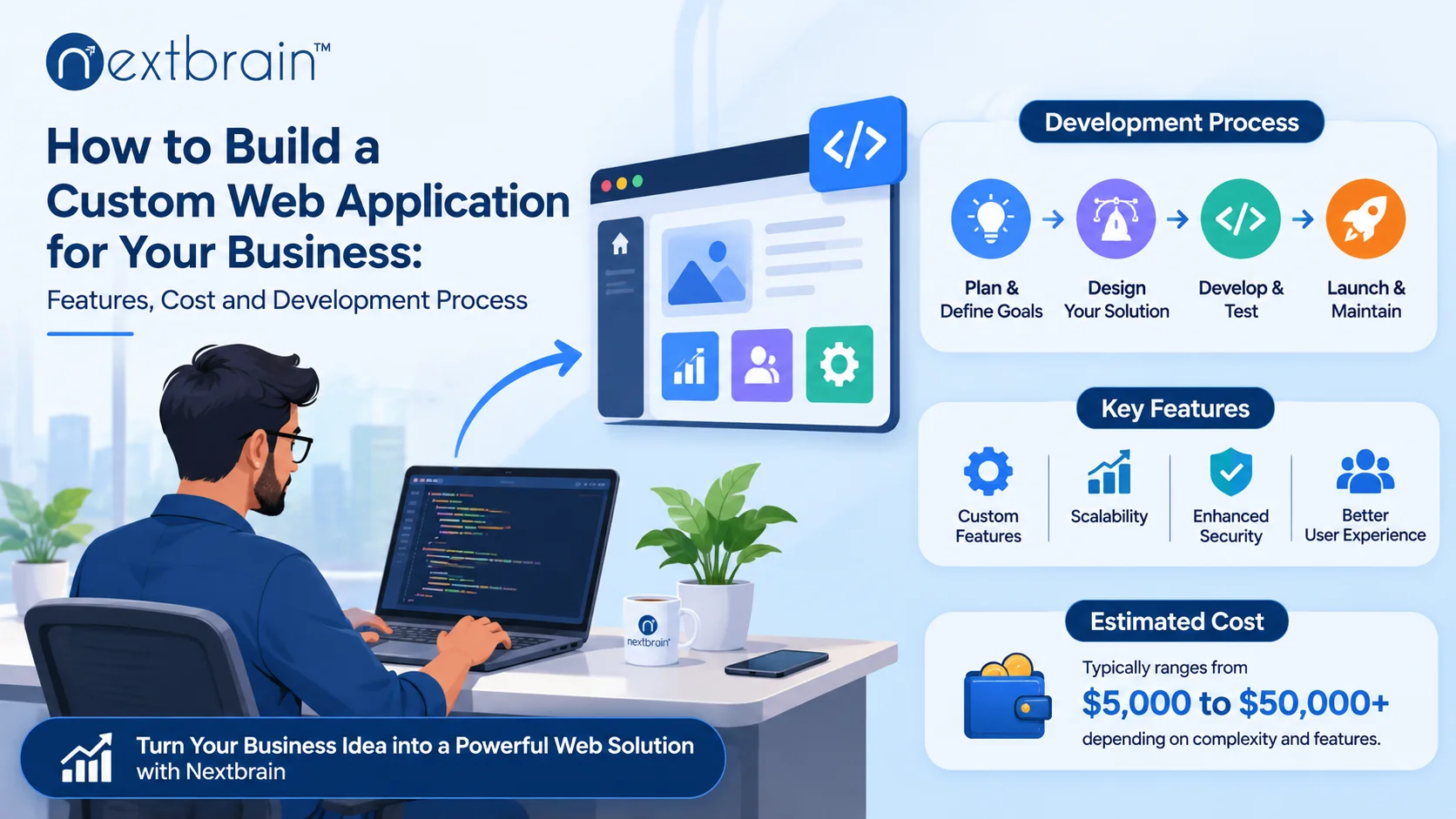
Businesses often reach a point where ready-made software no longer meets their operational needs. Managing customer information, tracking orders, coordinating employees, processing payments and handling daily operations through separate tools can become difficult as a business grows. A custom web application can bring these activities together in one platform designed around specific business requirements.
Choosing the right web application development company is an important step when turning a business idea into a working digital product. The right development partner can help you identify essential features, select suitable technologies, plan the budget and build an application that supports your business goals.
But where should you start? What features should your application include? How much should you budget, and what does the development process involve? This guide explains the important decisions businesses should consider before starting a custom web application project.
1. What Is a Custom Web Application?
A custom web application is a software solution developed specifically for a business, its customers or its internal teams. Unlike standard off-the-shelf software, which offers predefined features, a custom application is designed around your workflows, operational requirements and long-term objectives.
Users can access a web application through a browser on desktops, laptops, tablets and smartphones without necessarily installing separate software.
For example, a retail business might need an application to manage products, orders, payments and customer accounts. A healthcare organisation may require a platform for appointment scheduling, patient records and communication. A logistics company might need a system for shipment tracking, fleet coordination and delivery management.
The application is developed according to the actual problems the business wants to solve.
2. Why Should Businesses Invest in Custom Web Applications?
A custom web application is not simply about having your own software. It is about creating a digital platform that supports the way your business operates.
Here are some important reasons businesses consider custom development.
Better alignment with business operations
Every business has different processes. Ready-made software may include unnecessary features while missing functions that your team needs.
Custom applications allow businesses to build workflows around their actual requirements, making it easier to manage daily activities.
Improved operational efficiency
When information is spread across spreadsheets, emails and separate applications, employees may spend unnecessary time updating records and switching between tools.
A connected web application can centralise important activities and reduce repetitive manual work.
Easier integration with existing systems
Businesses often use CRM platforms, ERP software, payment gateways, accounting tools and other third-party services.
A custom web application can integrate with relevant systems through APIs, helping information move between platforms more efficiently.
Flexibility as your business grows
Your initial requirements may change as you acquire more customers, expand into new markets or introduce additional services.
A well-planned application architecture makes it easier to add features, support more users and adapt the platform to changing business needs.
Greater control over features and user experience
You can decide how users interact with the application, which functions are available to different roles and how information is presented.
This helps create a more relevant experience for customers, employees and administrators.
3. What Features Should Your Custom Web Application Include?
The features you choose should depend on the purpose of your application and the people who will use it. Rather than adding every available function, start with the features that solve your most important business problems.
User registration and authentication
If your application requires individual user accounts, include a secure registration and login system.
Depending on the application, this may include:
- Email and password registration
- Email or mobile verification
- Password recovery
- Secure session management
- Multi-factor authentication where required
User roles and access management
Not every user should have access to the same information or functions.
Role-based access control can help businesses manage permissions for administrators, employees, customers, vendors and other user groups.
For example, an administrator may manage the entire platform, while a customer can only view their own orders and account information.
Admin dashboard
An administrative dashboard gives authorised users an overview of important business activities.
Depending on the application, it may include:
- User and account management
- Orders and transaction records
- Operational reports
- Activity monitoring
- Product or service management
- System configuration
Search and filtering
Search and filtering functions help users find information without navigating through large amounts of data.
An e-commerce application may need product filters, while a logistics platform may require shipment searches based on delivery status, location or tracking number.
Payment gateway integration
If your application involves online transactions, payment gateway integration can support secure payment processing.
The right payment solution depends on your business model, target market, supported currencies and transaction requirements.
Notifications and alerts
Notifications help users stay informed about important activities.
Examples include order confirmations, payment updates, appointment reminders, account notifications and delivery status changes.
These notifications can be delivered through email, SMS or in-app messaging, depending on the application.
Reporting and analytics
Business owners and managers need visibility into how their applications are performing.
Reporting features can help monitor sales, customer activity, inventory, operational performance and other business-specific metrics.
Third-party API integrations
Your application may need to communicate with external services such as CRM platforms, ERP systems, maps, payment gateways and communication tools.
API integration helps connect these services while reducing the need for employees to manage information across disconnected platforms.
4. Choose the Right Type of Web Application for Your Business
Before starting development, identify the type of application that best supports your business model.
Here are some common examples.
E-commerce web applications
E-commerce platforms allow businesses to sell products or services online. Common features include product catalogues, shopping carts, customer accounts, payment processing, order tracking and inventory management.
SaaS applications
Software-as-a-Service applications allow customers to access software through a subscription or usage-based model.
Examples include project management platforms, accounting tools, CRM systems and business management software.
Customer portals
Customer portals provide a central place where customers can access account information, submit requests, track orders, view documents and communicate with a business.
Enterprise web applications
Enterprise applications support internal business operations such as employee management, inventory control, workflow management, reporting and resource planning.
Marketplace applications
Marketplace platforms connect buyers and sellers or service providers through a single digital environment. They may include vendor accounts, product listings, search filters, booking features, payments and transaction management.
Industry-specific applications
Some businesses need software designed around specialised industry workflows.
For example:
- Healthcare: Appointment scheduling, patient management and digital records.
- Manufacturing: Inventory tracking, production monitoring and workforce coordination.
- Real estate: Property listings, enquiry management and appointment scheduling.
- Logistics: Fleet management, shipment tracking and warehouse operations.
- Education: Course management, student portals and online learning.
- Finance: Account management, transaction tracking and financial reporting.
Identifying the right application type early helps define the features, technology and development budget.
5. How Much Does Custom Web Application Development Cost?
One of the first questions business owners ask is how much it costs to build a custom web application.
There is no single price that applies to every project. The cost depends on the application's purpose, number of features, technical complexity, integrations, security requirements and development timeline.
A simple application with basic user registration and an administrative dashboard will generally require a different investment from an enterprise platform with multiple user roles, complex workflows and third-party integrations.
Factors that influence development costs
1. Application complexity
The number of screens, user roles, workflows and business rules can influence the development effort.
2. UI/UX design requirements
A basic interface and a highly customised user experience involve different design requirements. Interactive dashboards, advanced navigation and custom user journeys may require additional work.
3. Frontend and backend development
Frontend development focuses on what users see and interact with. Backend development manages application logic, databases, authentication and communication between systems.
Both need to work together to deliver a reliable application.
4. Third-party integrations
Integrating payment gateways, CRM systems, ERP platforms, maps and other external services can increase development complexity.
5. Security and performance requirements
Applications that handle sensitive information or support large numbers of users may require additional security controls, testing and infrastructure planning.
6. Maintenance and future enhancements
Development costs do not end when an application goes live. Hosting, monitoring, security updates, bug fixes and new features should also be considered when planning the overall investment.
How can businesses manage their development budget?
Start by identifying the essential features required for the first release. Avoid investing in every possible feature before validating whether users actually need them.
A practical approach is to develop a Minimum Viable Product (MVP). An MVP includes the core functionality needed to launch the application, gather feedback and understand how users interact with it.
Additional features can then be introduced based on business priorities and user feedback.
For a project-specific estimate, discuss your requirements, expected features, integrations and timeline with a development team before finalising the budget.
6. Which Technologies Are Used to Build Custom Web Applications?
The technology stack determines how an application is developed, deployed, maintained and scaled.
The right choice depends on the application requirements, expected traffic, security needs, integration requirements and available development expertise.
Some commonly used technologies include:
Frontend technologies
Frontend technologies are responsible for the interface and user interactions.
- React.js
- Angular
- Vue.js
- Next.js
Backend technologies
Backend technologies handle business logic, authentication, APIs and data processing.
- Node.js
- Python
- .NET
- Laravel
- Java
Database technologies
Databases store and organise application information.
- PostgreSQL
- MongoDB
- Redis
Cloud and infrastructure
Cloud platforms provide infrastructure for hosting, deploying and managing applications.
- Amazon Web Services (AWS)
- Microsoft Azure
- Google Cloud Platform
The development team should select technologies based on the project's actual needs rather than simply choosing the most popular framework.
For a deeper understanding of how application components work together, explore this guide to web application architecture.
7. The Custom Web Application Development Process
A successful application requires more than writing code. It involves planning, design, development, testing, deployment and ongoing improvement.
Here is a typical development process.
Step 1: Requirement analysis and project planning
The first step is understanding what the business wants to achieve.
The development team discusses the target users, business objectives, existing challenges, essential features, integrations and expected outcomes.
The requirements are then organised into a project scope with clear priorities.
Step 2: Wireframing and UI/UX design
Once the requirements are defined, designers create wireframes to show how the application will be structured.
These wireframes help plan navigation, screen layouts and user journeys before detailed interface design begins.
Interactive prototypes can also help stakeholders review the proposed experience and provide feedback.
Step 3: Technology selection and architecture planning
The development team selects suitable frontend, backend, database and infrastructure technologies.
The application architecture should consider security, performance, integration requirements and future growth.
Step 4: Development and API integration
Developers build the frontend and backend components according to the approved requirements.
They also implement necessary integrations with payment gateways, CRM systems, ERP platforms and other third-party services.
An agile development approach can help teams release features in stages and collect feedback throughout the project.
Step 5: Testing and quality assurance
Before launch, the application needs to be tested to identify errors and usability issues.
Testing may include:
- Functional testing
- Cross-browser and device compatibility testing
- Integration testing
- Performance testing
- Security testing
- User acceptance testing
Testing helps confirm that the application works as expected before it becomes available to users.
Step 6: Deployment and launch
After testing and approval, the application is deployed to the selected hosting environment.
The launch process includes configuring the production environment, databases, domain settings, security controls and monitoring tools.
Step 7: Maintenance and continuous improvement
After launch, the application should be monitored and maintained.
Regular updates, security patches, performance improvements and feature enhancements help keep the platform reliable as business requirements change.
8. How to Choose the Right Web Application Development Partner
Selecting a development partner is an important business decision. The team you choose should understand your requirements and have the technical capability to deliver the application.
Consider these factors before making a decision.
Review relevant project experience: Look for applications that demonstrate experience with similar features, integrations or industry requirements.
Evaluate technical expertise: Check whether the team works with technologies suitable for your project.
Understand the development process: Ask how requirements, design approvals, development milestones, testing and project communication are handled.
Discuss security practices: Understand how the team approaches authentication, access control, data protection and security testing.
Clarify pricing and deliverables: Request a detailed estimate that explains the scope, milestones, deliverables and any ongoing costs.
Check post-launch support: Confirm how maintenance, bug fixes, updates and future enhancements will be handled.
A reliable development partner should be willing to understand your business problem before recommending a technical solution.
9. Why Consider Nextbrain Technologies for Your Web Application Project?
Building a custom web application requires a combination of business understanding, design expertise and technical execution.
Nextbrain Technologies provides tailored web application development services for startups, SMEs and enterprises. Its capabilities include custom web applications, SaaS platforms, e-commerce solutions, progressive web applications, MVP development and API integrations.
The team works with technologies such as React, Angular, Vue.js, Node.js, Python, .NET and Laravel, selecting the technology stack according to project requirements.
Nextbrain also highlights its experience across industries including healthcare, e-commerce, finance, manufacturing, logistics, education and real estate.
Its portfolio includes projects such as MachFox, a machine installation and service management platform designed to improve field operations and service tracking.
Conclusion
A custom web application can help businesses manage operations, improve customer experiences and create digital services that match their specific requirements. However, building the right application starts with understanding the problem, identifying essential features and planning the development process carefully.
From selecting the technology stack to estimating costs, testing functionality and preparing for future growth, every decision contributes to the success of the final product.
If you are planning to build a new web application or modernise an existing platform, working with an experienced development team can help you move from an initial idea to a practical digital solution.
Looking to build a custom web application for your business? Connect with Nextbrain Technologies to discuss your project requirements, features and development approach.
Frequently Asked Questions
1. How much does it cost to build a custom web application?
The cost depends on the application's features, complexity, design requirements, integrations, technology stack and security needs. A development team can provide a project-specific estimate after reviewing the requirements.
2. How long does it take to develop a custom web application?
The timeline depends on the scope and complexity of the project. A basic application may take several weeks, while a feature-rich enterprise platform can require several months or longer.
3. What is the difference between a website and a web application?
A website primarily presents information for visitors to browse. A web application provides interactive functionality, such as user accounts, dashboards, transactions, data management and business workflows.
4. Can a custom web application integrate with existing business software?
Yes. Custom web applications can integrate with compatible CRM, ERP, payment gateway, accounting and other third-party platforms through APIs and supported integration methods.
5. Can a web application be upgraded after launch?
Yes. Developers can add new features, improve performance, update security, integrate additional services and expand application capacity as business requirements change.